




Wednesday , October 21, 2026


For years, the standard way for a law firm to give people access to its systems from anywhere was a virtual desktop, very often delivered through Citrix. It solved a real problem: practice management systems that weren't built for the browser, sitting on servers that needed to be reached securely from home and from other offices.
That problem hasn't gone away for every firm, but the options have changed. Microsoft now offers two virtual desktop services of its own, Azure Virtual Desktop and Windows 365, and more practice management systems now run in a web browser. Some firms that renewed their virtual desktop contract out of habit could have stopped needing one altogether.
This guide explains the differences in plain terms and suggests the questions to answer before your next renewal.
Why law firms use virtual desktops in the first place
A virtual desktop is a Windows desktop that runs on a server somewhere else. Your team connects to it from their laptop or home computer, and everything runs on the remote machine rather than on their device.
For law firms, the main reasons have been:
- Practice management systems that need to sit close to their database. Many traditional systems run poorly over a remote connection unless the application itself runs next to the data.
- Remote and multi-site working. Everyone gets the same desktop wherever they are.
- Control. Data stays on the server rather than on individual laptops.
Those are reasonable goals. The question is whether a virtual desktop is still the best way to meet them for your firm.
Citrix
Citrix is the long-established name in virtual desktops and remains a capable, mature platform. It's often delivered to law firms by a hosting provider or as part of a hosted practice management service.
Where it works well: large or complex environments, firms with specialist applications that must stay on servers, and organisations with in-house expertise to manage it.
What to watch:
- Licensing has changed. Since Citrix was taken private and merged into Cloud Software Group in 2022, licensing has moved firmly towards subscriptions, and new perpetual licences for the core products are no longer sold. Many firms have found renewals look quite different from what they paid before. Check your terms well ahead of renewal.
- Collaboration tools can struggle. Teams and Zoom calls inside a shared virtual desktop often mean awkward window switching, screen-sharing problems and poor call quality unless the environment is carefully set up.
- It depends on the connection. If home broadband drops, so does the working day.
- It's often a second bill. Citrix hosting usually sits on top of your IT support and Microsoft 365 costs, which makes the total easy to underestimate.
Azure Virtual Desktop
Azure Virtual Desktop (AVD) is Microsoft's own virtual desktop service, running in Microsoft's Azure cloud.
How it's paid for: many firms already own the right to use it. According to Microsoft's licensing guidance, Microsoft 365 Business Premium, E3 and E5 licences include eligibility for AVD's Windows desktop, so the main costs are the Azure computing, storage and networking it runs on. Because that's charged on usage, desktops can be scaled down or switched off outside working hours.
Where it works well: firms that still need to run a practice management system or other applications on a server, want to move away from a third-party hosting arrangement, and want several users to share each virtual machine to keep costs efficient.
What to watch:
- It needs proper design and management. Images, user profiles, networking, security and cost controls all need setting up well and looking after. Done badly, AVD can cost more than expected and feel no better than what it replaced.
- Teams works well when set up properly. Microsoft supports media optimisation for Teams on AVD, which moves call audio and video to the user's own device. It relies on supported clients and configuration, so it's worth checking it's in place.
Windows 365
Windows 365 gives each user their own dedicated Windows computer in the cloud, known as a Cloud PC, for a fixed monthly price per user.
How it's paid for: a predictable per-user subscription, with the size of the Cloud PC (processor, memory and storage) setting the price. Windows 365 Business is designed for organisations of up to 300 users and needs no Azure set-up. Windows 365 Enterprise offers more control and is managed through Microsoft Intune alongside your physical laptops.
Where it works well: smaller firms that want simplicity and predictable costs, people who need their own persistent desktop every day, and firms that want a virtual desktop without taking on the complexity of running one.
What to watch:
- No sharing. Each user gets their own Cloud PC, so it's less cost-efficient where many people only use a desktop occasionally.
- Less flexibility. You trade some control for simplicity. Firms with complex networking or application requirements may find AVD fits better.
The option many firms overlook: no virtual desktop at all
If your practice management system and other core applications run in a browser, you may not need a virtual desktop at all.
In that model, the laptop is the workplace. Identity and access are controlled through Microsoft Entra ID, devices are managed and secured through Intune wherever they are, and documents and email live in Microsoft 365 with data protection policies applied. There's no remote desktop layer in between, no separate hosting bill, and Teams calls run natively on the device.
This was the approach discussed by Doyle Clayton's CTO in our Goodbye Citrix, Hello Microsoft 365 webinar. It isn't right for every firm, and it depends heavily on your software, but it's worth ruling in or out before you renew anything.
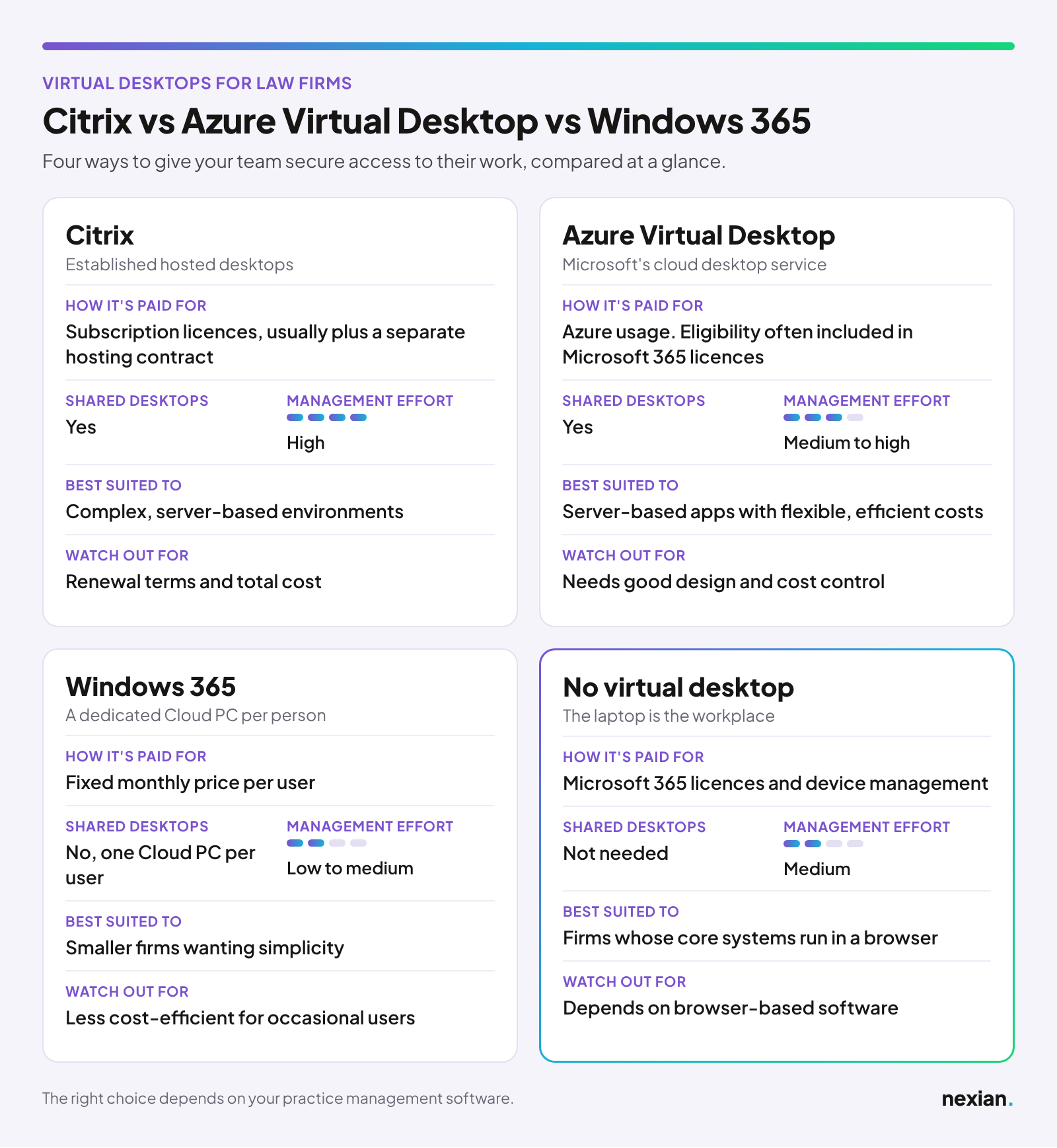
At a glance:
How to decide
Before your next renewal, work through these questions.
- Does your practice management system need a server, or does it run in a browser? This decides more than anything else. If it's browser-based, or moving that way, a virtual desktop may be an unnecessary cost.
- When does your current contract end? Avoid signing a new multi-year hosting or virtual desktop contract while your software strategy is still undecided. Plan the two together.
- How do your people work? Full-time desk users, occasional users, and people on the move all suit different models.
- What Microsoft 365 licences do you already have? You may already own rights you're not using.
- What do Teams calls feel like today? If calls inside your virtual desktop are a daily frustration, that's a sign the current setup isn't serving you.
- Who will manage it? Every option needs looking after. Make sure your IT provider has real experience with the one you choose.
One timely point: Microsoft's classic Teams app reached end of support on 1 October 2026, according to Microsoft's guidance. If your virtual desktop still runs classic Teams, it needs updating either way, which makes this a good moment to look at the wider setup.
What is your current setup costing you?
Hosting, virtual desktops and the servers behind them are often the largest and least visible part of a firm's IT spend. Our savings calculator gives you a quick estimate using your own numbers.
Frequently asked questions
Is Azure Virtual Desktop cheaper than Citrix?
It can be, but it depends on your licences, how many users share each desktop, how well the environment is sized and whether you're replacing a separate hosting contract. Many firms already own eligibility for AVD through Microsoft 365, which changes the comparison. Compare total costs over a few years rather than licence prices alone.
Can we run our practice management system on Azure Virtual Desktop?
In most cases, yes. AVD is commonly used to run server-based applications that don't work well over a normal remote connection. Check with your software vendor about supported configurations before you plan a move.
What is the difference between Windows 365 and Azure Virtual Desktop?
Windows 365 gives each user a dedicated Cloud PC for a fixed monthly price and is simpler to run. Azure Virtual Desktop is charged on usage, lets several users share a virtual machine, and offers more control, but needs more design and management.
Does Microsoft Teams work properly in a virtual desktop?
It can. On Azure Virtual Desktop, Teams media optimisation moves call audio and video to the user's own device, which makes a big difference to call quality. It needs supported clients and the right configuration. Without it, calls inside a virtual desktop are often poor.
Do we still need Citrix if we move to the cloud?
Not necessarily. Firms moving to the cloud can choose Azure Virtual Desktop or Windows 365 instead, and firms whose core systems run in a browser may not need a virtual desktop at all. The right answer depends on your applications, so start there.
Talk to us
If your Citrix or hosting renewal is coming up, or you're not sure which of these options fits your firm, get in touch with the team. We'll give you an honest view, including whether you need a virtual desktop at all.
Download the
Whitepaper
nexian.co.uk/legal-modern-workplace-whitepaper
Or get in touch with the team if you would like to talk through where your firm is on its technology journey.